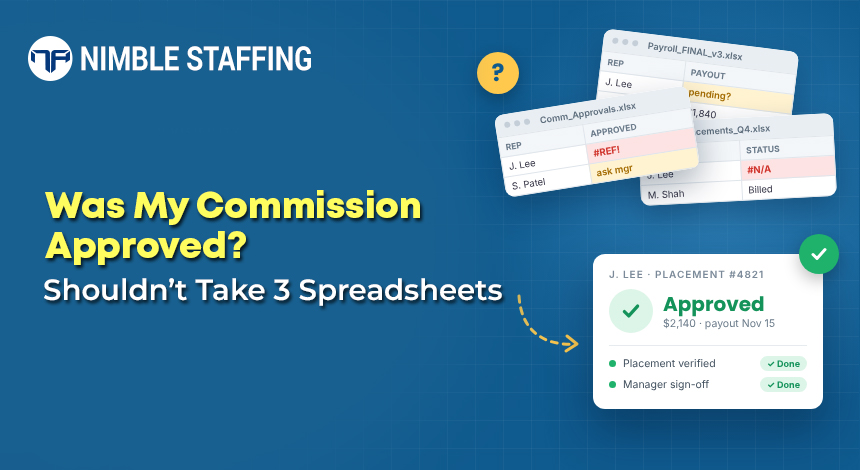
Every time a recruiter asks, “Was my commission approved?” and finance can’t answer without digging through three spreadsheets and an email thread, that’s the system failing. Commission disputes are one of the fastest ways to erode trust with the people driving your revenue. And in a staffing firm, where commissions touch multiple roles, billing models, and client agreements, the complexity compounds quickly.
Commission tracking software built for staffing firms doesn’t just calculate faster. It makes commission payments transparent, accurate, auditable, and financially sound, connecting compensation directly to invoices, collections, and profitability.
What Is Commission Tracking Software for Staffing Firms?
Commission tracking software is a system that tracks commission eligibility, applies compensation rules, calculates the commission earned, records approval status, and connects to accounting and payroll for clean reconciliation.
A general-purpose commission calculator won’t account for the revenue models unique to staffing. A staffing-focused solution handles:
- Fixed fees per qualifying placement
- Revenue share as a percentage of placement fees
- Gross profit or margin-based commissions
- Commission triggered on invoice issuance vs. cash collection
- Split credit across recruiters and account managers
- Different rates for different roles, such as recruiters, AEs, and branch managers
Eligibility may also depend on collection status, client agreement type, minimum margin thresholds, probationary periods, and shared placement credit. A good system makes these rules explicit, rather than leaving finance to interpret them differently each pay cycle.
Why Spreadsheets Break Down as Staffing Firms Grow
If your firm is small and your pay plans are simple, a spreadsheet may work. But as placements, recruiters, and clients grow, the cracks appear fast.
-
- Calculation errors multiply. Different staff maintain their own formulas and interpretations of the pay plan. Duplicate entries, outdated rates, and formula errors accumulate silently until a recruiter disputes a payout.
- No real-time commission status. Whether a commission has been created, approved, earned, or paid lives across finance files, payroll records, and email threads, so every question costs time.
- Commissions paid before cash is collected. If your policy says commissions are paid after client payment, your system must track unpaid invoices and block premature payouts. One missed filter means a commission goes out before the invoice clears, a direct hit to cash flow.
- Margin blindness. A placement may generate strong revenue but thin gross profit after consultant fees, employer taxes, and benefits. Without margin guardrails, you may be rewarding behavior that weakens profitability.
- Painful reconciliations. Reconciling payroll entries, general ledger lines, invoice records, and commission calculations by hand is time-consuming and audit-unfriendly. A single disputed commission can take hours to untangle.
What Commission Complexity Looks Like in Practice
Scenario: 50-Consultant Firm, Three Commission Tiers
Acme Staffing has 50 active W2 contractors, two account managers, and four recruiters each on a different commission structure.
- Recruiter A earns 5% of gross profit on direct placements, rising to 7% above a $15,000 GP threshold (incremental only)
- Account Manager B earns 3% of invoiced revenue, but only after client payment is confirmed
- A shared placement between two recruiters splits credit 60/40 based on documented origination
In a spreadsheet, this requires separate tabs, manual payment-matching, and someone who remembers the rules correctly every pay cycle. In Nimble Staffing, the rules are configured once and applied automatically including the incremental vs. retroactive distinction on the tiered plan.
W2 vs. 1099: Commission Structures Often Differ
Many staffing firms run W2 contractors and 1099 independents simultaneously, but compensation rules and the costs that define gross profit are not the same across both.
W2 contractors carry employer-side costs: payroll taxes, benefits contributions, workers’ comp. These reduce gross profit and should factor into margin-based commission calculations. For 1099 placements, those costs shift to the contractor, changing the GP baseline entirely.
Your commission tracking system needs to handle both models cleanly, with the GP calculation methodology documented and consistently applied not left to whoever built the spreadsheet this quarter.
Key Features to Look for in Commission Tracking Software
Flexible Compensation Rules
The platform should support revenue-based percentages, flat rates, fixed amounts, and margin-based commissions. It should also allow you to document eligibility criteria, payment triggers, thresholds, and approval workflows in one place.
Invoice and Collection-Based Triggers
Your system must distinguish between commissions owed on invoice issuance and commissions paid after cash collection. It should match payments to the correct invoices and handle partial payments, credit notes, and adjustments without manual intervention.
Accurate Placement and Recruiter Attribution
Commission calculations depend on accurate ownership records. The system must capture placement, client, consultant, recruiter, account manager, and any shared credit agreements documented before calculation, not reconstructed after a dispute.
Payroll and Accounting Integration
Commission records should sync to payroll and accounting without manual re-entry. Confirm what data is synced, what approvals are required, and whether the integration is native or bolt-on. Native connections are more reliable.
Accruals and Audit Trails
Finance teams need a full record of commission earned, calculation methodology, accrual amounts, any adjustments, approvals, and final payment. When a plan changes or a transaction is reversed, that audit trail is essential both for internal review and for external audits.
Commission Reporting and Profitability Analysis
A good commission dashboard should answer questions like:
-
- What is total commission expense this month?
- Which commissions are tied to outstanding invoices?
- Who are the highest-earning recruiters, and what is their GP contribution?
- What is commission cost as a percentage of gross profit by placement type?
- Are any placements generating commissions that exceed their margin contribution?
The Main Commission Models Explained
Model 1: Fixed commission per placement. A recruiter earns a fixed amount per placement meeting defined criteria. The firm must clearly define what qualifies as a completed placement and how cancellations, replacements, and guarantee-period refunds are handled.
Model 2: Percentage of placement revenue. The recruiter receives a percentage of the qualifying fee. For example, a direct-hire placement fee of $20,000 at a 10% commission rate = $2,000. The agreement must specify whether the basis is invoiced revenue, recognized income, or collected cash.
Model 3: Gross profit percentage. This model aligns pay with profitability. A contract assignment generates $10,000 in revenue, and direct labor and employment costs total $7,500. Gross profit is $2,500, so at 10% of GP, commission = $250. The firm must define precisely which direct costs are included and how adjustments are handled when costs change after commission is paid.
Model 4: Tiered commission plans. Rates increase as recruiters hit revenue or GP targets. The critical question is whether the higher rate applies only to earnings above the threshold (incremental) or retroactively to all qualifying earnings (retroactive). The payouts differ significantly, so the plan document must state the rule explicitly and the software must calculate accordingly.
Manual Tracking vs. Nimble Staffing: Side-by-Side
| Area | Manual Spreadsheets | Nimble Staffing |
|---|---|---|
|
Commission calculation |
Error-prone; relies on individual formulas |
Automated rules engine fixed, %, or margin-based |
|
Collection-based triggers |
Hard to track; often missed |
Links commissions to invoice payment status |
|
Audit trail |
No formal trail; email threads |
Full history: who approved, when, and what changed |
|
Recruiter visibility |
No real-time status; must ask finance |
Dashboard shows earned, pending, and paid |
|
Payroll integration |
Manual re-entry into payroll system |
Direct sync with payroll and accounting modules |
|
Tiered plan support |
Complex, error-prone in spreadsheets |
Correctly handles incremental vs. retroactive rates |
|
Reconciliation effort |
High; manual cross-check each pay period |
Automated — reduces close-cycle workload significantly |
How to Implement Commission Tracking Software Effectively
- Document current compensation plans. Collect all written agreements, payment triggers, approval rules, and exclusions including any informal arrangements currently handled outside the plan.
- Verify source data accuracy. Ensure recruiter records, client information, placement details, invoice records, and payment data are complete and consistent before configuring the system.
- Prepare calculation logic. Define exactly what triggers each commission, and document the procedures for cancellations, credit notes, shared placements, and disputes.
- Test against historical transactions. Run software calculations against previously approved commission statements. Investigate material differences before going live.
- Configure approvals and controls. Assign responsibility for approving payments, granting exceptions, and reviewing commission calculations.
- Monitor ongoing. Track commission expenses, commission as a percentage of gross profit, disputed calculations, and payment timeliness each period.
How Nimble Staffing Supports Commission Management
Nimble staffing’s commission module is built into the staffing accounting platform not bolted on. It supports fixed, percentage, and margin-based commission structures, and handles both invoice-triggered and collection-triggered payment rules.
Because it sits inside the same system handling invoices, payroll journal entries, and financial close, commission management doesn’t end when a figure is calculated. The sum is immediately available for review, accrual, reconciliation, and payment without re-entering data or switching systems.
Ask our team to walk through your actual commission plan including collection-based triggers, margin calculations, approval workflow, and payroll integration requirements so you can see what exactly how your structure maps to the platform.
Make Commission Management Work for Your Staffing Firm
Standardize your commission rules, automate calculations, and eliminate payout disputes.
Nimble staffing connects commission management to invoicing, collections, and payroll
So, your finance team spends less time on reconciliation and more time on decisions that matter.
Visit nimblestaffing.net to see how it works for your firm.
Frequently Asked Questions
What is the best commission tracking software for staffing firms?
The best solution supports your specific commission models, provides reliable audit trails, automates calculations, and ties commission data directly to invoices and accounting. Nimble staffing purpose-built for US staffing operations and handles the full range fixed fees, revenue percentages, margin-based structures, and collection-based triggers within the same platform your finance team already uses for invoicing and close.
Can commission software calculate recruiter commissions automatically?
Yes – once your compensation rules and source data are correctly configured, the system automates calculation. Exceptions, disputed placements, and plan changes will still require a review step, but routine calculations run without manual intervention.
Can commission software handle collection-based payment rules?
Yes – Nimble Staffing supports collection-based commission triggers. It matches payments to invoices and can hold commission payouts until client payment is confirmed, including handling partial payments, credit notes, and adjustments.
What does commission automation mean for the finance team?
It reduces manual calculation work, improves consistency across pay periods, simplifies reconciliation with payroll and the general ledger, creates a defensible audit trail, and gives leadership better visibility into true commission cost relative to gross profit.
How do W2 and 1099 placements affect commission calculations?
W2 placements carry employer-side costs (payroll taxes, benefits, workers’ comp) that reduce gross profit and therefore affect margin-based commission amounts. These costs don’t apply the same way to 1099 placements. Your commission system should handle both correctly with the GP basis clearly defined for each placement type.